MCP with Quarkus LangChain4j
This article shows how to use Quarkus LangChain4j support for MCP (Model Context Protocol) on both the server and client sides. You will learn how to serve tools and prompts on the server side and discover them in the Quarkus MCP client-side application. The Model Context Protocol is a standard for managing contextual interactions with AI models. It provides a standardized way to connect AI models to external data sources and tools. It can help with building complex workflows on top of LLMs.
This article is the second part of a series describing some of the Quarkus AI project’s most notable features. Before reading this article, I recommend checking out two previous parts of the tutorial:
- Part 1: Getting Started with Quarkus LangChain4j and Chat Model
- Part 2: AI Tool Calling with Quarkus LangChain4j
You can also compare Quarkus’ support for MCP with similar support on the Spring AI side. You can find the article I mentioned on my blog here.
Source Code
Feel free to use my source code if you’d like to try it out yourself. To do that, you must clone my sample GitHub repository. Then you should only follow my instructions.
Architecture for the Quarkus MCP Scenario
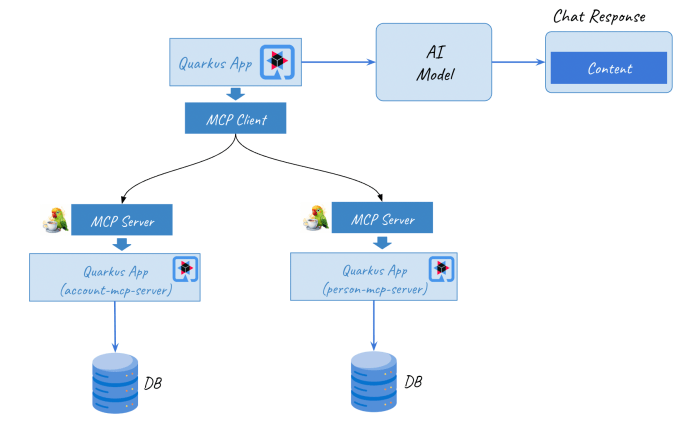
Let’s start with a diagram of our application architecture. Two Quarkus applications act as MCP servers. They connect to the in-memory database and use Quarkus LangChain4j MCP Server support to expose @Tool methods to the MCP client-side app. The client-side app communicates with the OpenAI model. It includes the tools exposed by the server-side apps in the user query to the AI model. The person-mcp-server app provides @Tool methods for searching persons in the database table. The account-mcp-server is doing the same for the persons’ accounts.
Build an MCP Server with Quarkus
Both MCP server applications are similar. They connect to the H2 database via the Quarkus Panache ORM extension. Both provide MCP API via Server-Sent Events (SSE) transport. Here’s a list of required Maven dependencies:
<dependencies>
  <dependency>
    <groupId>io.quarkiverse.mcp</groupId>
    <artifactId>quarkus-mcp-server-sse</artifactId>
  </dependency>
  <dependency>
    <groupId>io.quarkus</groupId>
    <artifactId>quarkus-hibernate-orm-panache</artifactId>
  </dependency>
  <dependency>
    <groupId>io.quarkus</groupId>
    <artifactId>quarkus-jdbc-h2</artifactId>
  </dependency>
  <dependency>
    <groupId>io.quarkus</groupId>
    <artifactId>quarkus-junit5</artifactId>
    <scope>test</scope>
  </dependency>
</dependencies>Let’s start with the person-mcp-server application. Here’s the @Entity class for interacting with the person table. It uses Panache support to avoid the need for getter and setter declarations.
@Entity
public class Person extends PanacheEntityBase {

    @Id
    @GeneratedValue(strategy = GenerationType.IDENTITY)
    public Long id;
    public String firstName;
    public String lastName;
    public int age;
    public String nationality;
    @Enumerated(EnumType.STRING)
    public Gender gender;

}The PersonRepository class contains a single method for searching persons by their nationality:
@ApplicationScoped
public class PersonRepository implements PanacheRepository<Person> {

    public List<Person> findByNationality(String nationality) {
        return find("nationality", nationality).list();
    }

}Next, prepare the “tools service” that searches for a single person by ID or a list of people of a given nationality in the database. Each method must be annotated with @Tool and include a description in the description field. Quarkus LangChain4j does not allow a Java List to be returned, so we need to wrap it using a dedicated Persons object.
@ApplicationScoped
public class PersonTools {

    PersonRepository personRepository;

    public PersonTools(PersonRepository personRepository) {
        this.personRepository = personRepository;
    }

    @Tool(description = "Find person by ID")
    public Person getPersonById(
            @ToolArg(description = "Person ID") Long id) {
        return personRepository.findById(id);
    }

    @Tool(description = "Find all persons by nationality")
    public Persons getPersonsByNationality(
            @ToolArg(description = "Nationality") String nationality) {
        return new Persons(personRepository.findByNationality(nationality));
    }
}Here’s our List<Person> wrapper:
public class Persons {

    private List<Person> persons;

    public Persons(List<Person> persons) {
        this.persons = persons;
    }

    public List<Person> getPersons() {
        return persons;
    }

    public void setPersons(List<Person> persons) {
        this.persons = persons;
    }
}The implementation of the account-mcp-server application is essentially very similar. Here’s the @Entity class for interacting with the account table. It uses Panache support to avoid the need for getter and setter declarations.
@Entity
public class Account extends PanacheEntityBase {

    @Id
    @GeneratedValue(strategy = GenerationType.IDENTITY)
    public Long id;
    public String number;
    public int balance;
    public Long personId;

}The AccountRepository class contains a single method for searching accounts by person ID:
@ApplicationScoped
public class AccountRepository implements PanacheRepository<Account> {

    public List<Account> findByPersonId(Long personId) {
        return find("personId", personId).list();
    }

}Once again, the list inside the “tools service” must be wrapped by the dedicated object. The single method annotated with @Tool returns a list of accounts assigned to a given person.
@ApplicationScoped
public class AccountTools {

    AccountRepository accountRepository;

    public AccountTools(AccountRepository accountRepository) {
        this.accountRepository = accountRepository;
    }

    @Tool(description = "Find all accounts by person ID")
    public Accounts getAccountsByPersonId(
            @ToolArg(description = "Person ID") Long personId) {
        return new Accounts(accountRepository.findByPersonId(personId));
    }

}The person-mcp-server starts on port 8082, while the account-mcp-server listens on port 8081. To change the default HTTP, use the quarkus.http.port property in your application.properties file.
Build an MCP Client with Quarkus
Our application interacts with the OpenAI chat model, so we must include the Quarkus LangChain4j OpenAI extension. In turn, to integrate the client-side application with MCP-compliant servers, we need to include the quarkus-langchain4j-mcp extension.
<dependencies>
  <dependency>
    <groupId>io.quarkus</groupId>
    <artifactId>quarkus-rest-jackson</artifactId>
  </dependency>
  <dependency>
    <groupId>io.quarkiverse.langchain4j</groupId>
    <artifactId>quarkus-langchain4j-openai</artifactId>
    <version>${quarkus.langchain4j.version}</version>
  </dependency>
  <dependency>
    <groupId>io.quarkiverse.langchain4j</groupId>
    <artifactId>quarkus-langchain4j-mcp</artifactId>
    <version>${quarkus.langchain4j.version}</version>
  </dependency>
</dependencies>The sample-client Quarkus app interacts with both the person-mcp-server app and the account-mcp-server app. Therefore, it defines two AI services. As with a standard AI application in Quarkus, those services must be annotated with @RegisterAiService. Then we define methods and prompt templates, also with annotations @UserMessage or @SystemMessage. If a given method is to use one of the MCP servers, it must be annotated with @McpToolBox. The name inside the annotation corresponds to the MCP server name set in the configuration properties. The PersonService AI service visible below uses the person-service MCP server.
@ApplicationScoped
@RegisterAiService
public interface PersonService {

    @SystemMessage("""
        You are a helpful assistant that generates realistic person data.
        Always respond with valid JSON format.
        """)
    @UserMessage("""
        Find persons with {nationality} nationality.
        Output **only valid JSON**, no explanations, no markdown, no ```json blocks.
        """)
    @McpToolBox("person-service")
    Persons findByNationality(String nationality);

    @SystemMessage("""
        You are a helpful assistant that generates realistic person data.
        Always respond with valid JSON format.
        """)
    @UserMessage("How many persons come from {nationality} ?")
    @McpToolBox("person-service")
    int countByNationality(String nationality);

}The AI service shown above corresponds to this configuration. You need to specify the MCP server’s name and address. As you remember, person-mcp-server listens on port 8082. The client application uses the name person-service here, and the standard endpoint to MCP SSE for Quarkus is /mcp/sse. To explore the solution itself, it is also worth enabling logging of MCP requests and responses.
quarkus.langchain4j.mcp.person-service.transport-type = http
quarkus.langchain4j.mcp.person-service.url = http://localhost:8082/mcp/sse
quarkus.langchain4j.mcp.person-service.log-requests = true
quarkus.langchain4j.mcp.person-service.log-responses = trueHere is a similar implementation for the AccountService AI service. It interacts with the MCP server configured under the account-service name.
@ApplicationScoped
@RegisterAiService
public interface AccountService {

    @SystemMessage("""
        You are a helpful assistant that generates realistic data.
        Return a single number.
        """)
    @UserMessage("How many accounts has person with {personId} ID ?")
    @McpToolBox("account-service")
    int countByPersonId(int personId);

    @UserMessage("""
        How many accounts has person with {personId} ID ?
        Return person name, nationality and a total balance on his/her accounts.
        """)
    @McpToolBox("account-service")
    String balanceByPersonId(int personId);

}Here’s the corresponding configuration for that service. No surprises.
quarkus.langchain4j.mcp.account-service.transport-type = http
quarkus.langchain4j.mcp.account-service.url = http://localhost:8081/mcp/sse
quarkus.langchain4j.mcp.account-service.log-requests = true
quarkus.langchain4j.mcp.account-service.log-responses = trueFinally, we must provide some configuration to integrate our Quarkus application with Open AI chat model. It assumes that Open AI token is available as the OPEN_AI_TOKEN environment variable.
quarkus.langchain4j.chat-model.provider = openai
quarkus.langchain4j.log-requests = true
quarkus.langchain4j.log-responses = true
quarkus.langchain4j.openai.api-key = ${OPEN_AI_TOKEN}
quarkus.langchain4j.openai.timeout = 20sWe can test individual AI services by calling endpoints provided by the client-side application. There are two endpoints GET /count-by-person-id/{personId} and GET /balance-by-person-id/{personId} that use LLM prompts to calculate number of persons and a total balances amount of all accounts belonging to a given person.
@Path("/accounts")
public class AccountResource {

    private final AccountService accountService;

    public AccountResource(AccountService accountService) {
        this.accountService = accountService;
    }

    @POST
    @Path("/count-by-person-id/{personId}")
    public int countByPersonId(int personId) {
        return accountService.countByPersonId(personId);
    }

    @POST
    @Path("/balance-by-person-id/{personId}")
    public String balanceByPersonId(int personId) {
        return accountService.balanceByPersonId(personId);
    }

}MCP for Promps
MCP servers can also provide other functionalities beyond just tools. Let’s go back to the person-mcp-server app for a moment. To share a prompt message, you can create a class that defines methods returning the PromptMessage object. Then, we must annotate such methods with @Prompt, and their arguments with @PromptArg.
@ApplicationScoped
public class PersonPrompts {

    final String findByNationalityPrompt = """
        Find persons with {nationality} nationality.
        Output **only valid JSON**, no explanations, no markdown, no ```json blocks.
        """;

    @Prompt(description = "Find by nationality.")
    PromptMessage findByNationalityPrompt(@PromptArg(description = "The nationality") String nationality) {
        return PromptMessage.withUserRole(new TextContent(findByNationalityPrompt));
    }

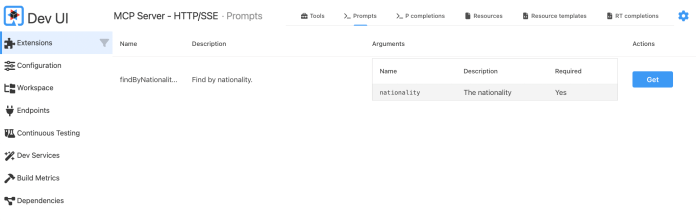
}Once we start the application, we can use Quarkus Dev UI to verify a list of provided tools and prompts.
Client-side integration with MCP prompts is a bit more complex than with tools. We must inject the McpClient to a resource controller to load a given prompt programmatically using its name.
@Path("/persons")
public class PersonResource {

    @McpClientName("person-service")
    McpClient mcpClient;

    // OTHET METHODS...

    @POST
    @Path("/nationality-with-prompt/{nationality}")
    public List<Person> findByNationalityWithPrompt(String nationality) {
        Persons p = personService.findByNationalityWithPrompt(loadPrompt(nationality), nationality);
        return p.getPersons();
    }

    private String loadPrompt(String nationality) {
        McpGetPromptResult prompt = mcpClient.getPrompt("findByNationalityPrompt", Map.of("nationality", nationality));
        return ((TextContent) prompt.messages().getFirst().content().toContent()).text();
    }
}In this case, the Quarkus AI service should not define the @UserMessage on the entire method, but just as the method argument. Then a prompt message is loaded from the MCP server and filled with the nationality parameter value before sending to the AI model.
@ApplicationScoped
@RegisterAiService
public interface PersonService {

    // OTHER METHODS...

    @SystemMessage("""
        You are a helpful assistant that generates realistic person data.
        Always respond with valid JSON format.
        """)
    @McpToolBox("person-service")
    Persons findByNationalityWithPrompt(@UserMessage String userMessage, String nationality);

}Testing MCP Tools with Quarkus
Quarkus provides a dedicated module for testing MCP tools. We can use after including the following dependency in the Maven pom.xml:
<dependency>
  <groupId>io.quarkiverse.mcp</groupId>
  <artifactId>quarkus-mcp-server-test</artifactId>
  <scope>test</scope>
</dependency>The following test verifies the MCP tool methods provided by the person-mcp-server application. The McpAssured class allows us to use SSE, streamable, and WebSocket test clients. To create a new client for SSE, invoke the newConnectedSseClient() static method. After that, we can use one of several available variants of the toolsCall(...) method to verify the response returned by a given @Tool.
@QuarkusTest
public class PersonToolsTest {

    ObjectMapper mapper = new ObjectMapper();

    @Test
    public void testGetPersonsByNationality() {
        McpAssured.McpSseTestClient client = McpAssured.newConnectedSseClient();
        client.when()
                .toolsCall("getPersonsByNationality", Map.of("nationality", "Denmark"),
                        r -> {
                            try {
                                Persons p = mapper.readValue(r.content().getFirst().asText().text(), Persons.class);
                                assertFalse(p.getPersons().isEmpty());
                            } catch (JsonProcessingException e) {
                                throw new RuntimeException(e);
                            }
                        })
                .thenAssertResults();
    }

    @Test
    public void testGetPersonById() {
        McpAssured.McpSseTestClient client = McpAssured.newConnectedSseClient();
        client.when()
                .toolsCall("getPersonById", Map.of("id", 10),
                        r -> {
                            try {
                                Person p = mapper.readValue(r.content().getFirst().asText().text(), Person.class);
                                assertNotNull(p);
                                assertNotNull(p.id);
                            } catch (JsonProcessingException e) {
                                throw new RuntimeException(e);
                            }
                        })
                .thenAssertResults();
    }
}Running Quarkus Applications
Finally, let’s run all our quarkus applications. Go to the mcp/account-mcp-server directory and run the application in development mode:
$ cd mcp/account-mcp-server
$ mvn quarkus:devThen do the same for the person-mcp-server application.
$ cd mcp/person-mcp-server
$ mvn quarkus:devBefore running the last sample-client application, export the OpenAI API token as the OPEN_AI_TOKEN environment variable.
$ cd mcp/sample-client
$ export OPEN_AI_TOKEN=<YOUR_OPENAI_TOKEN>
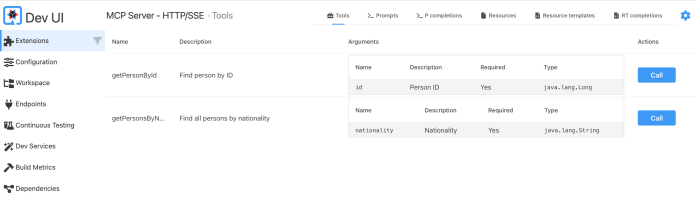
$ mvn quarkus:devWe can verify a list of tools or prompts exposed by each MCP server application by visiting its Quarkus Dev UI console. It provides a dedicated “MCP Server tile.”
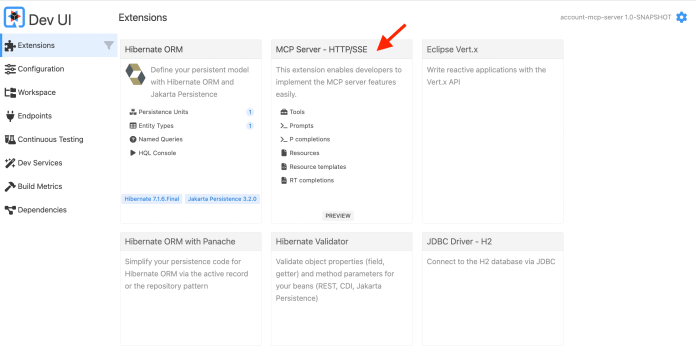
Here’s a list of tools provided by the person-mcp-server app via Quarkus Dev UI.
Then, we can switch to the sample-client Dev UI console. We can verify and test all interactions with the MCP servers from our client-side app.
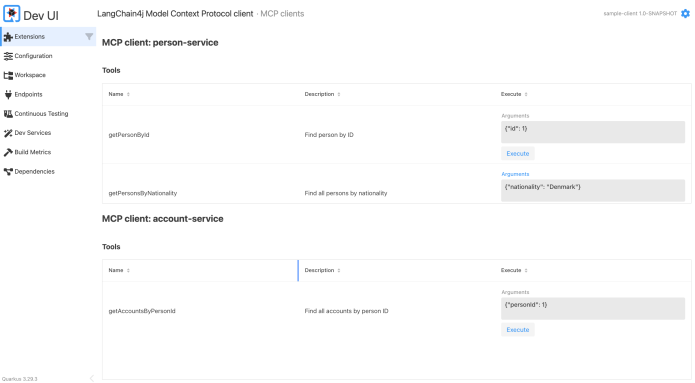
Once all the sample applications are running, we can test the MCP communication by calling the HTTP endpoints exposed by the sample-client app. Both person-mcp-server and account-mcp-server load some test data on startup using the import.sql file. Here are the test API calls for all the REST endpoints.
$ curl -X POST http://localhost:8080/persons/nationality/Denmark
$ curl -X POST http://localhost:8080/persons/count-by-nationality/Denmark
$ curl -X POST http://localhost:8080/persons/nationality-with-prompt/Denmark
$ curl -X POST http://localhost:8080/accounts/count-by-person-id/2
$ curl -X POST http://localhost:8080/accounts/balance-by-person-id/2Conclusion
With Quarkus, creating applications that use MCP is not difficult. If you understand the idea of tool calling in AI, understanding the MCP-based approach is not difficult for you. This article shows you how to connect your application to several MCP servers, implement tests to verify the elements shared by a given application using MCP, and support on the Quarkus Dev UI side.

Leave a Reply