AI Tool Calling with Quarkus LangChain4j
This article will show you how to use Quarkus LangChain4j AI support with the most popular chat models for the “tool calling” feature. Tool calling (sometimes referred to as function calling) is a typical pattern in AI applications that enables a model to interact with APIs or tools, extending its capabilities. The most popular AI models are trained to know when to call a function. The Quarkus LangChain4j extension offers built-in support for tool calling. In this article, you will learn how to define tool methods to get data from the third-party APIs and the internal database.
This article is the second part of a series describing some of the Quarkus AI project’s most notable features. Before reading on, I recommend checking out my introduction to Quarkus LangChain4j, which is available here. The first part describes such features as prompts, structured output, and chat memory. There is also a similar tutorial series about Spring AI. You can compare Quarkus support for tool calling described here with a similar Spring AI support described in the following post.
Source Code
Feel free to use my source code if you’d like to try it out yourself. To do that, you must clone my sample GitHub repository. Then you should only follow my instructions.
Tool Calling Motivation
For ease of comparison, this article will implement an identical scenario to an analogous application written in Spring AI. You can find a GitHub sample repository with the Spring AI app here. As you know, the “tool calling” feature helps us solve a common AI model challenge related to internal or live data sources. If we want to augment a model with such data, our applications must allow it to interact with a set of APIs or tools. In our case, the internal database (H2) contains information about the structure of our stock wallet. The sample Quarkus application asks an AI model about the total value of the wallet based on daily stock prices or the highest value for the last few days. The model must retrieve the structure of our stock wallet and the latest stock prices.
Use Tool Calling with Quarkus LangChain4j
Create ShareTools
Let’s begin with the ShareTools implementation, which is responsible for getting a list of the wallet’s shares from a database. It defines a single method annotated with @Tool. The most crucial element here is to provide a clear description of the method within the @Tool annotation. It allows the AI model to understand the function’s responsibilities. The method returns the number of shares for each company in our portfolio. It is retrieved from the database through the Quarkus Panache ORM repository.
@ApplicationScoped
public class ShareTools {

    private ShareRepository shareRepository;

    public ShareTools(ShareRepository shareRepository) {
        this.shareRepository = shareRepository;
    }

    @Tool("Return number of shares for each company in my wallet")
    public List<Share> getNumberOfShares() {
        return shareRepository.findAll().list();
    }
}The sample application launches an embedded, in-memory database and inserts test data into the stock table. Our wallet contains the most popular companies on the U.S. stock market, including Amazon, Meta, and Microsoft. Here’s a dataset inserted on application startup.
insert into share(id, company, quantity) values (1, 'AAPL', 100);
insert into share(id, company, quantity) values (2, 'AMZN', 300);
insert into share(id, company, quantity) values (3, 'META', 300);
insert into share(id, company, quantity) values (4, 'MSFT', 400);Create StockTools
The StockTools The class is responsible for interaction with the TwelveData stock API. It defines two methods. The getLatestStockPrices method returns only the latest close price for a specified company. It is a tool calling version of the method provided within the pl.piomin.services.functions.stock.StockService function. The second method is more complicated. It must return historical daily close prices for a defined number of days. Each price must be correlated with a quotation date.
@ApplicationScoped
public class StockTools {

    private Logger log;
    private StockDataClient stockDataClient;

    public StockTools(@RestClient StockDataClient stockDataClient, Logger log) {
        this.stockDataClient = stockDataClient;
        this.log = log;
    }

    @ConfigProperty(name = "STOCK_API_KEY", defaultValue = "none")
    String apiKey;

    @Tool("Return latest stock prices for a given company")
    public StockResponse getLatestStockPrices(String company) {
        log.infof("Get stock prices for: %s", company);
        StockData data = stockDataClient.getStockData(company, apiKey, "1min", 1);
        DailyStockData latestData = data.getValues().get(0);
        log.infof("Get stock prices (%s) -> %s", company, latestData.getClose());
        return new StockResponse(Float.parseFloat(latestData.getClose()));
    }

    @Tool("Return historical daily stock prices for a given company")
    public List<DailyShareQuote> getHistoricalStockPrices(String company, int days) {
        log.infof("Get historical stock prices: %s for %d days", company, days);
        StockData data = stockDataClient.getStockData(company, apiKey, "1min", days);
        return data.getValues().stream()
                .map(d -> new DailyShareQuote(company, Float.parseFloat(d.getClose()), d.getDatetime()))
                .toList();
    }

}Here’s the DailyShareQuote Java record returned in the response list.
public record DailyShareQuote(String company, float price, String datetime) {
}Here’s a @RestClient responsible for calling the TwelveData stock API.
@RegisterRestClient(configKey = "stock-api")
public interface StockDataClient {

    @GET
    @Path("/time_series")
    StockData getStockData(@RestQuery String symbol,
                           @RestQuery String apikey,
                           @RestQuery String interval,
                           @RestQuery int outputsize);
}For the demo, you can easily enable complete logging of both communication with the AI model through LangChain4j and with the stock API via @RestClient.
quarkus.langchain4j.log-requests = true
quarkus.langchain4j.log-responses = true
quarkus.rest-client.stock-api.url = https://api.twelvedata.com
quarkus.rest-client.logging.scope = request-response
quarkus.rest-client.stock-api.scope = all
%dev.quarkus.log.category."org.jboss.resteasy.reactive.client.logging".level = DEBUGQuarkus LangChain4j Tool Calling Flow
You can easily register @Tools on your Quarkus AI service with the tools argument inside the @RegisterAiService annotation. The calculateWalletValueWithTools() method calculates the value of our stock wallet in dollars. It uses the latest daily stock prices for each company’s shares from the wallet. Since this method directly returns the response received from the AI model, it is essential to perform additional validation of the content received. For this purpose, a so-called guardrail should be implemented and set in place. We can easily achieve it with the @OutputGuardrails annotation. The calculateHighestWalletValue method calculates the value of our stock wallet in dollars for each day in the specified period determined by the days variable. Then it must return the day with the highest stock wallet value.
@RegisterAiService(tools = {StockTools.class, ShareTools.class})
public interface WalletAiService {

    @UserMessage("""
    What’s the current value in dollars of my wallet based on the latest stock daily prices ?

    Return subtotal value in dollars for each company in my wallet.
    In the end, return the total value in dollars wrapped by ***.
    """)
    @OutputGuardrails(WalletGuardrail.class)
    String calculateWalletValueWithTools();

    @UserMessage("""
    On which day during last {days} days my wallet had the highest value in dollars based on the historical daily stock prices ?
    """)
    String calculateHighestWalletValue(int days);
}Here’s the implementation of the guardrail that validates the response returned by the calculateWalletValueWithTools method. It verifies if the total value in dollars is wrapped by *** and starts with the $ sign.
@ApplicationScoped
public class WalletGuardrail implements OutputGuardrail {

    Pattern pattern = Pattern.compile("\\*\\*\\*(.*?)\\*\\*\\*");

    private Logger log;

    public WalletGuardrail(Logger log) {
        this.log = log;
    }

    @Override
    public OutputGuardrailResult validate(AiMessage responseFromLLM) {
        try {
            Matcher matcher = pattern.matcher(responseFromLLM.text());
            if (matcher.find()) {
                String amount = matcher.group(1);
                log.infof("Extracted amount: %s", amount);
                if (amount.startsWith("$")) {
                    return success();
                }
            }
        } catch (Exception e) {
            return reprompt("Invalid text format", e, "Make sure you return a valid requested text");
        }
        return failure("Total amount not found");
    }
}Here’s the REST endpoints implementation. It uses the WalletAiService bean to interact with the AI model. It exposes two endpoints: GET /wallet/with-tools and GET /wallet/highest-day/{days}.
@Path("/wallet")
@Produces(MediaType.TEXT_PLAIN)
public class WalletController {

    private final WalletAiService walletAiService;

    public WalletController(WalletAiService walletAiService) {
        this.walletAiService = walletAiService;
    }

    @GET
    @Path("/with-tools")
    public String calculateWalletValueWithTools() {
        return walletAiService.calculateWalletValueWithTools();
    }

    @GET
    @Path("/highest-day/{days}")
    public String calculateHighestWalletValue(int days) {
        return walletAiService.calculateHighestWalletValue(days);
    }

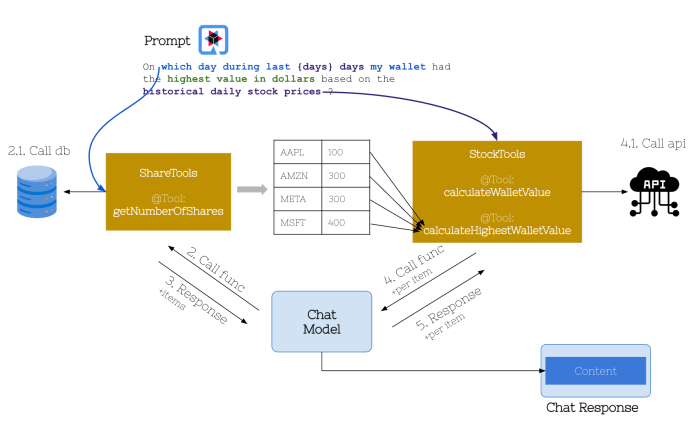
}The following diagram illustrates the flow for the second use case, which returns the day with the highest stock wallet value. First, it must connect to the database and retrieve the stock wallet structure, which contains the number of shares for each company. Then, it must call the stock API for every company found in the wallet. So, finally, the method calculateHighestWalletValue should be called four times with different values of the company name parameter and a value of the days determined by the HTTP endpoint path variable. Once all the data is collected, the AI model calculates the highest wallet value and returns it together with the quotation date.
Automated Testing
Most of my repositories are automatically updated to the latest versions of libraries. After updating the library version, automated tests are run to verify that everything works as expected. To verify the correctness of today’s scenario, we will mock stock API calls while integrating with the actual OpenAI service. To mock API calls, you can use the quarkus-junit5-mockito extension.
<dependency>
  <groupId>io.quarkus</groupId>
  <artifactId>quarkus-junit5</artifactId>
  <scope>test</scope>
</dependency>
<dependency>
  <groupId>io.quarkus</groupId>
  <artifactId>quarkus-junit5-mockito</artifactId>
  <scope>test</scope>
</dependency>
<dependency>
  <groupId>io.rest-assured</groupId>
  <artifactId>rest-assured</artifactId>
  <scope>test</scope>
</dependency>The following JUnit test verifies two endpoints exposed by WalletController. As you may remember, there is also an output guardrail set on the AI service called by the GET /wallet/with-tools endpoint.
@QuarkusTest
@TestMethodOrder(MethodOrderer.OrderAnnotation.class)
class WalletControllerTest {

    @InjectMock
    @RestClient
    StockDataClient stockDataClient;

    @BeforeEach
    void setUp() {
        // Mock the stock data responses
        StockData aaplStockData = createMockStockData("AAPL", "150.25");
        StockData amznStockData = createMockStockData("AMZN", "120.50");
        StockData metaStockData = createMockStockData("META", "250.75");
        StockData msftStockData = createMockStockData("MSFT", "300.00");

        // Mock the stock data client responses
        when(stockDataClient.getStockData(eq("AAPL"), anyString(), anyString(), anyInt()))
            .thenReturn(aaplStockData);
        when(stockDataClient.getStockData(eq("AMZN"), anyString(), anyString(), anyInt()))
            .thenReturn(amznStockData);
        when(stockDataClient.getStockData(eq("META"), anyString(), anyString(), anyInt()))
            .thenReturn(metaStockData);
        when(stockDataClient.getStockData(eq("MSFT"), anyString(), anyString(), anyInt()))
            .thenReturn(msftStockData);
    }

    private StockData createMockStockData(String symbol, String price) {
        DailyStockData dailyData = new DailyStockData();
        dailyData.setDatetime("2023-01-01");
        dailyData.setOpen(price);
        dailyData.setHigh(price);
        dailyData.setLow(price);
        dailyData.setClose(price);
        dailyData.setVolume("1000");

        StockData stockData = new StockData();
        stockData.setValues(List.of(dailyData));
        return stockData;
    }

    @Test
    @Order(1)
    void testCalculateWalletValueWithTools() {
        given()
          .when().get("/wallet/with-tools")
          .then().statusCode(200)
                 .contentType(ContentType.TEXT)
                 .body(notNullValue())
                 .body(not(emptyString()));
    }

    @Test
    @Order(2)
    void testCalculateHighestWalletValue() {
        given()
          .pathParam("days", 7)
          .when().get("/wallet/highest-day/{days}")
          .then().statusCode(200)
                 .contentType(ContentType.TEXT)
                 .body(notNullValue())
                 .body(not(emptyString()));
    }
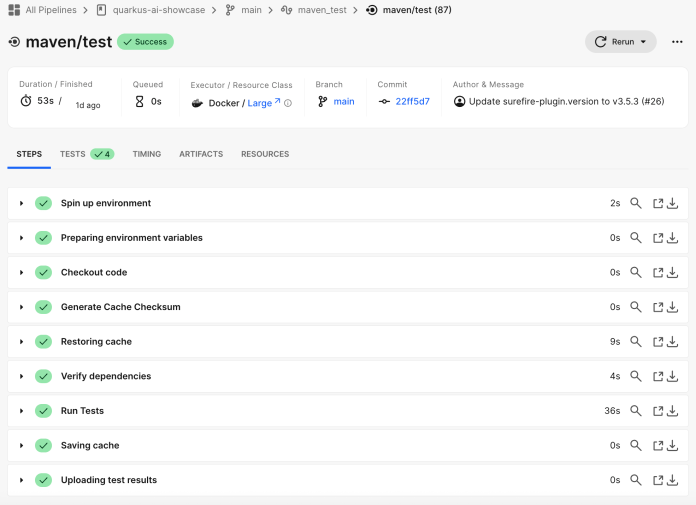
}Tests can be automatically run, for example, by the CircleCI pipeline on each dependency update via the pull request.
Run the Application to Verify Tool Calling
Before starting the application, we must set environment variables with the AI model and stock API tokens.
$ export OPEN_AI_TOKEN=<YOUR_OPEN_AI_TOKEN>
$ export STOCK_API_KEY=<YOUR_STOCK_API_KEY>Then, run the application in development mode with the following command:
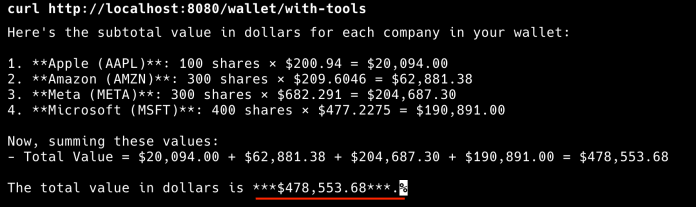
mvn quarkus:devOnce the application is started, you can call the first endpoint. The GET /wallet/with-tools calculates the total least value of the stock wallet structure stored in the database.
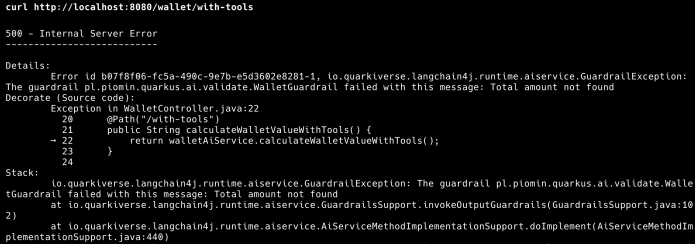
curl http://localhost:8080/wallet/with-toolsYou can see either the response from the chat AI model or the exception thrown after an unsuccessful validation using a guardrail. If LLM response validation fails, the REST endpoint returns the HTTP 500 code.
Here’s the successfully validated LLM response.
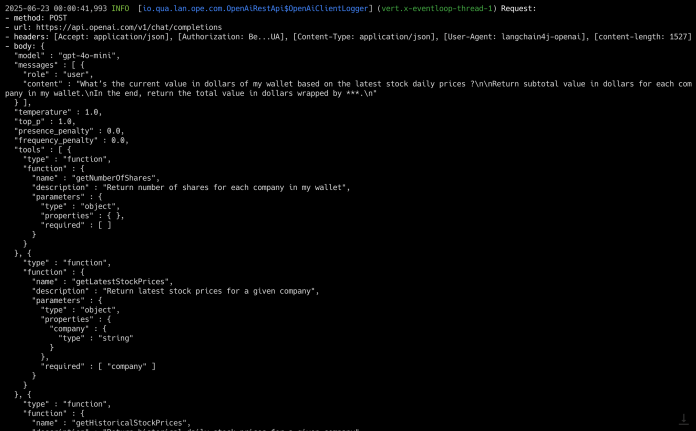
The sample Quarkus application logs the whole communication with the AI model. Here, you can see a first request containing a list of registered functions (tools) along with their descriptions.
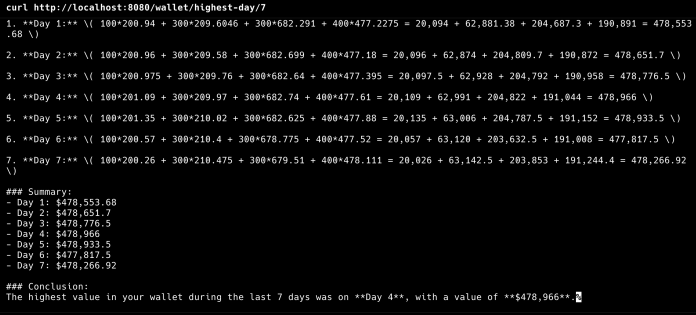
Then we can call the GET /wallet/highest-day/{days} endpoint to return the day with the highest wallet value. Let’s calculate it for the last 7 days.
curl http://localhost:8080/wallet/highest-day/7Here’s the response.
Finally, you can perform a similar test as before, but for the Mistral AI model. Before running the application, set your API token for Mistral AI and rename the default model to mistralai.
$ export MISTRAL_AI_TOKEN=<YOUR_MISTRAL_AI_TOKEN>
$ export AI_MODEL_PROVIDER=mistralaiThen, run the sample Quarkus application with the following command and repeat the same “tool calling” tests as before.
mvn quarkus:dev -Pmistral-aiFinal Thoughts
Quarkus LangChain4j provides a seamless way to run tools in AI-powered conversations. You can register a tool by adding it as a part of the @RegisterAiService annotation. Also, you can easily add a guardrail on the selected AI service method. Tools are a vital part of agentic AI and the MCP concepts. It is therefore essential to understand it properly. You can expect more articles on Quarkus LangChain4j soon, including on MCP.


2 COMMENTS