Quarkus with Buildpacks and OpenShift Builds
In this article, you will learn how to build Quarkus application images using Cloud Native Buildpacks and OpenShift Builds. Some time ago, I published a blog post about building with OpenShift Builds based on the Shipwright project. At that time, Cloud Native Buildpacks were not supported at the OpenShift Builds level. It was only supported in the community project. I demonstrated how to add the appropriate build strategy yourself and use it to build an image for a Spring Boot application. However, OpenShift Builds, since version 1.6, support building with Cloud Native Buildpacks. Currently, Quarkus, Go, Node.js, and Python are supported. In this article, we will focus on Quarkus and also examine the built-in support for Buildpacks within Quarkus itself.
Source Code
Feel free to use my source code if you’d like to try it out yourself. To do that, you must clone my sample GitHub repository. Then you should only follow my instructions.
Quarkus Buildpacks Extension
Recently, support for Cloud Native Buildpacks in Quarkus has been significantly enhanced. Here you can access the repository containing the source code for the Paketo Quarkus buildpack. To implement this solution, add one dependency to your application.
<dependency>
  <groupId>io.quarkus</groupId>
  <artifactId>quarkus-container-image-buildpack</artifactId>
</dependency>Next, run the build command with Maven and activate the quarkus.container-image.build parameter. Also, set the appropriate Java version needed for your application. For the sample Quarkus application in this article, the Java version is 21.
mvn clean package \
  -Dquarkus.container-image.build=true \
-Dquarkus.buildpack.builder-env.BP_JVM_VERSION=21To build, you need Docker or Podman running. Here’s the output from the command run earlier.
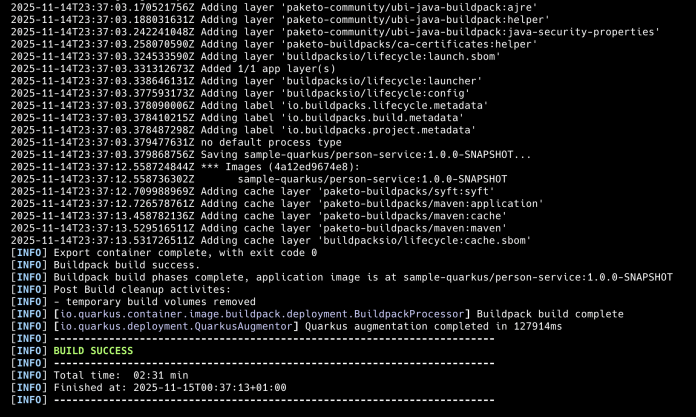
As you can see, Quarkus uses, among other buildpacks, the buildpack as mentioned earlier.

The new image is now available for use.
$ docker images sample-quarkus/person-service:1.0.0-SNAPSHOT
REPOSITORY                      TAG              IMAGE ID       CREATED        SIZE
sample-quarkus/person-service 1.0.0-SNAPSHOT e0b58781e040 45 years ago 160MBQuarkus with OpenShift Builds Shipwright
Install the Openshift Build Operator
Now, we will move the image building process to the OpenShift cluster. OpenShift offers built-in support for creating container images directly within the cluster through OpenShift Builds, using the BuildConfig solution. For more details, please refer to my previous article. However, in this article, we explore a new technology for building container images called OpenShift Builds with Shipwright. To enable this solution on OpenShift, you need to install the following operator.

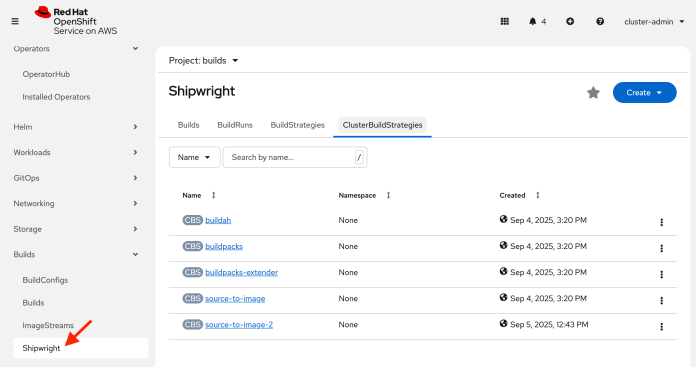
After installing this operator, you will see a new item in the “Build” menu called “Shiwright”. Switch to it, then select the “ClusterBuildStrategies” tab. There are two strategies on the list designed for Cloud Native Buildpacks. We are interested in the buildpacks strategy.
Create and Run Build with Shipwright
Finally, we can create the Shiwright Build object. It contains three sections. In the first step, we define the address of the container image repository where we will push our output image. For simplicity, we will use the internal registry provided by the OpenShift cluster itself. In the source section, we specify the repository address where the application source code is located. In the last section, we need to set the build strategy. We chose the previously mentioned buildpacks strategy for Cloud Native Buildpacks. Some parameters need to be set for the buildpacks strategy: run-image and cnb-builder-image. The cnb-builder-image indicates the name of the builder image containing the buildpacks. The run-image refers to a base image used to run the application. We will also activate the buildpacks Maven profile during the build to set the Quarkus property that switches from fast-jar to uber-jar packaging.
apiVersion: shipwright.io/v1beta1
kind: Build
metadata:
  name: buildpack-quarkus-build
spec:
  env:
    - name: BP_JVM_VERSION
      value: '21'
  output:
    image: 'image-registry.openshift-image-registry.svc:5000/builds/sample-quarkus-microservice:1.0'
  paramValues:
    - name: run-image
      value: 'paketobuildpacks/run-java-21-ubi9-base:latest'
    - name: cnb-builder-image
      value: 'paketobuildpacks/builder-jammy-java-tiny:latest'
    - name: env-vars
      values:
        - value: BP_MAVEN_ADDITIONAL_BUILD_ARGUMENTS=-Pbuildpacks
  retention:
    atBuildDeletion: true
  source:
    git:
      url: 'https://github.com/piomin/sample-quarkus-microservice.git'
    type: Git
  strategy:
    kind: ClusterBuildStrategy
name: buildpacksHere’s the Maven buildpacks profile that sets a single Quarkus property quarkus.package.jar.type. We must change it to uber-jar, because the paketobuildpacks/builder-jammy-java-tiny builder expects a single jar instead of the multi-folder layout used by the default fast-jar format. Of course, I would prefer to use the paketocommunity/builder-ubi-base builder, which can recognize the fast-jar format. However, at this time, it does not function correctly with OpenShift Builds.
<profiles>
  <profile>
    <id>buildpacks</id>
    <activation>
      <property>
        <name>buildpacks</name>
      </property>
    </activation>
    <properties>
      <quarkus.package.jar.type>uber-jar</quarkus.package.jar.type>
    </properties>
  </profile>
</profiles>To start the build, you can use the OpenShift console or execute the following command:
shp build run buildpack-quarkus-build --followWe can switch to the OpenShift Console. As you can see, our build is running.
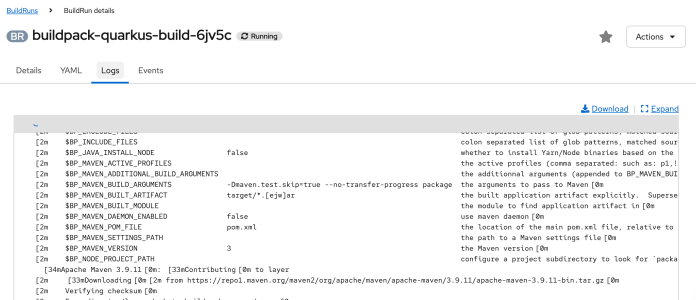
The history of such builds is available on OpenShift. You can also review the build logs.
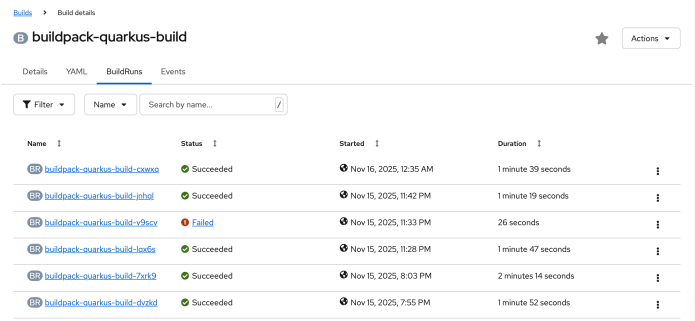
Finally, you should see your image in the list of OpenShift internal image streams.
$ oc get imagestream
NAME                          IMAGE REPOSITORY                                                                                                    TAGS                UPDATED
sample-quarkus-microservice default-route-openshift-image-registry.apps.pminkows.95az.p1.openshiftapps.com/builds/sample-quarkus-microservice 1.2,0.0.1,1.1,1.0 13 hours agoConclusion
OpenShift Build Shipwright lets you perform the entire application image build process on the OpenShift cluster in a standardized manner. Cloud Native Buildpacks is a popular mechanism for building images without writing a Dockerfile yourself. In this case, support for Buildpacks on the OpenShift side is an interesting alternative to the Source-to-Image approach.

Leave a Reply